Round 12 · Today · Visual explainer
How a camera sensor captures colour
Same prompt, no human help: Claude Opus 5.5 and GPT-6 Astra each built how a camera sensor captures colour as a visual explanation.
Press Play on both to watch each explanation; use its own buttons to pause and step.
- Claude Opus 5.5AnthropicUnscored
Time: 17m 51sCost: $3.57
- GPT-6 AstraOpenAIUnscored
Time: 9m 41sCost: $1.98


- Claude Opus 5.5 Leading2 votes · 100%
- GPT-6 Astra0 votes · 0%
Voting open · 46h left
The battle video
Which result do you think is best?
The community vote decides this battle's result. Voting closes Oct 24, 2026, 2:34 PM GMT+9.
2 votes so far (provisional) · Community favorite: Claude Opus 5.5
- Claude Opus 5.5100% · 2
- GPT-6 Astra0% · 0
Play it yourself
What each of the 2 models built, live in your browser
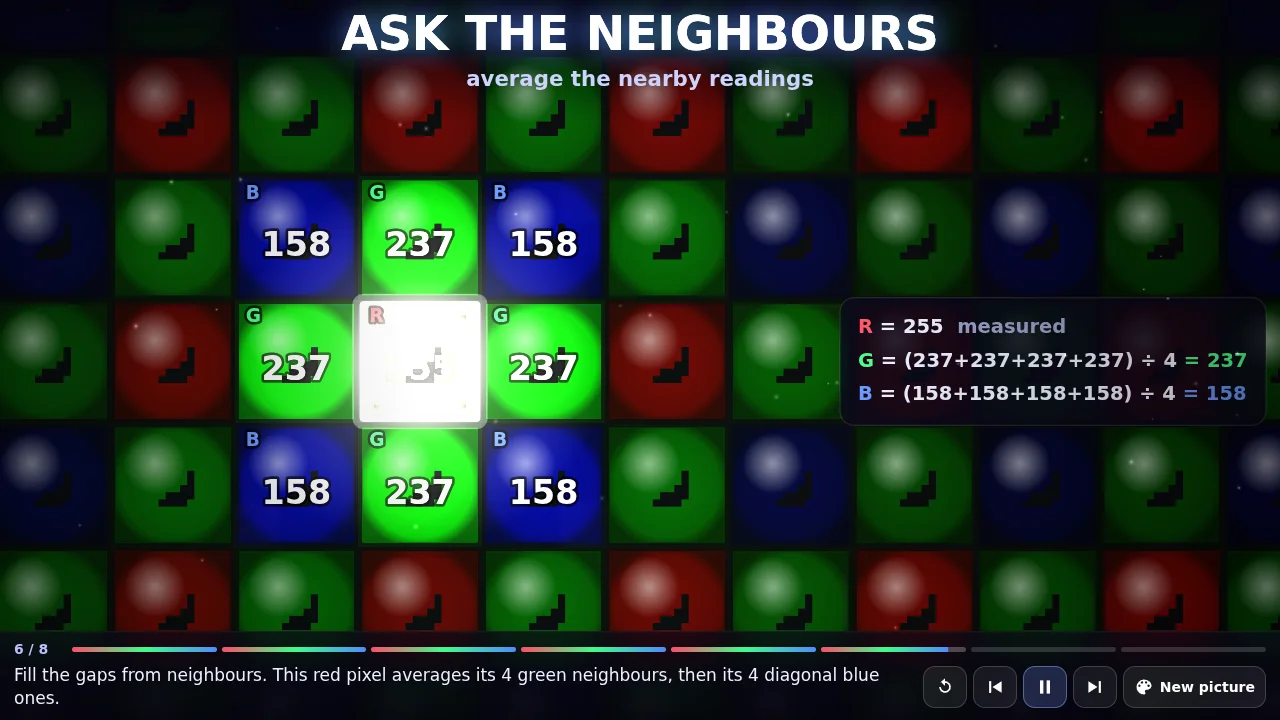
- Time
- 17m 51s
- Cost
- $3.57est.
- Tests
- 8/8
- Tokens
- 1,797,935
Passed 8 of 8 standard checks.
Run record
- Requested model
- claude-opus-5-5
- Resolved version
- claude-opus-5-5
- Tool / harness
- Claude Code 2.1.307
- Settings
- effort: high
- Attempts
- 1
- Human help
- None recorded
- Tool access
- Read, Write, Edit, ls, grep, wc, node --check
- Environment
- Linux server, a private empty folder (randomly named, not shared with the other model)
- Limits
- 30-minute timeout
- Input / output tokens
- 1,685,296 / 112,639
- Token details
- uncached_input: 30 · thinking_output: 75070 · cache_read_input: 1559098 · cache_creation_input: 126168 · cache_creation_1h_input: 126168 · cache_creation_5m_input: 0
- Cost basis
- Estimated
- Measurement notes
- Wall time measured by the daily worker (same method for both). Tokens from Claude Code's JSON result. Rules from the standard daily checks. Cost estimated from the recorded tokens × the provider's official list prices (checked 2026-10-10).
- Executed
- Oct 22, 2026, 1:40 PM GMT+9
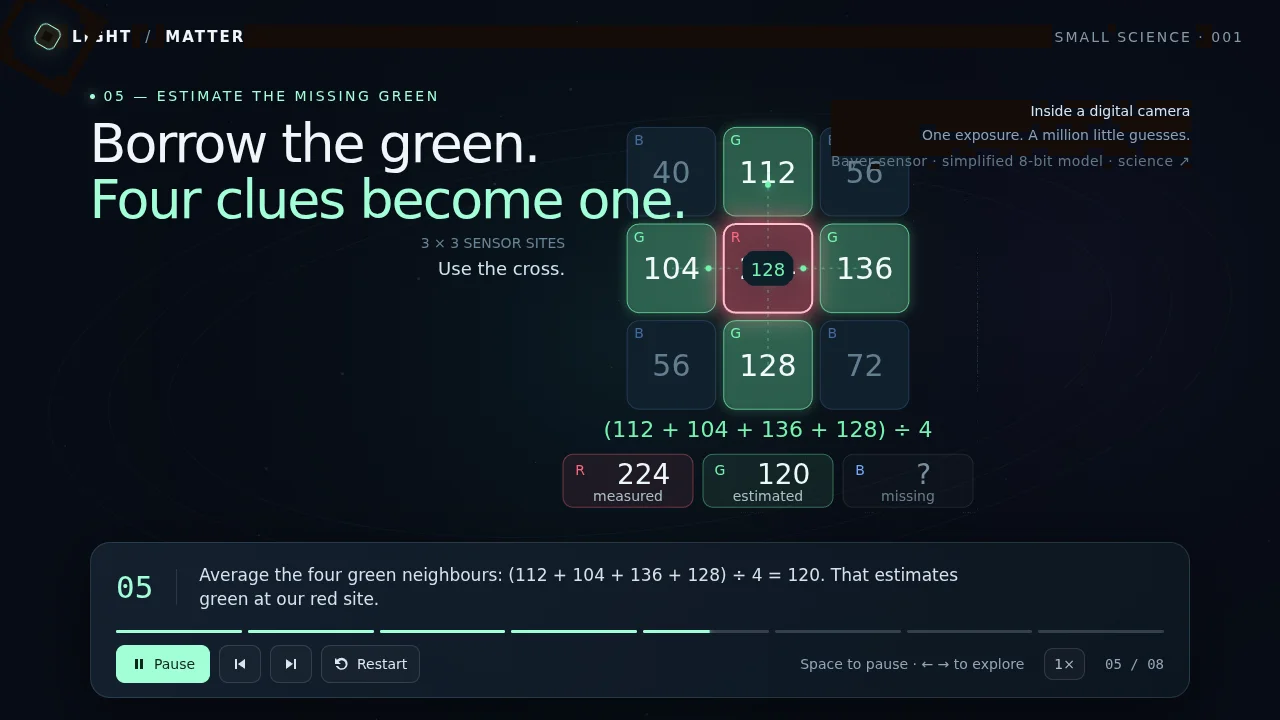
- Time
- 9m 41s
- Cost
- $1.98est.
- Tests
- 8/8
- Tokens
- 365,683
Passed 8 of 8 standard checks.
Run record
- Requested model
- gpt-6-astra
- Resolved version
- Not available
- Tool / harness
- Codex CLI 0.163.0
- Settings
- reasoning_effort: high
- Attempts
- 1
- Human help
- None recorded
- Tool access
- Shell commands in a workspace-write sandbox (network off)
- Environment
- Linux server, a private empty folder (randomly named, not shared with the other model)
- Limits
- 30-minute timeout
- Input / output tokens
- 343,858 / 21,825
- Token details
- cached_input: 282880 · reasoning_output: 7249 · cache_write_input: 0
- Cost basis
- Estimated
- Measurement notes
- Wall time measured by the daily worker (same method for both). Tokens from codex exec --json (turn.completed usage). Rules from the standard daily checks. Cost estimated from the recorded tokens × the provider's official list prices (checked 2026-10-10).
- Executed
- Oct 22, 2026, 1:40 PM GMT+9
How the result is decided
The community vote decides: when the poll closes, the side with more votes wins. Equal votes is a draw, and fewer than 10 votes is too few to call.
- Claude Opus 5.58/8 checks
- GPT-6 Astra8/8 checks
The checks, time and cost are facts about each build, not a score. One observed run under stated conditions — not a universal ranking. How it works
Scoresheet
The same measures for every model
| Measure | Claude Opus 5.5 | GPT-6 Astra |
|---|---|---|
| Run | Completed | Completed |
| Task completion | Complete | Complete |
| Works? | Works | Works |
| Tests passed | 8/8 | 8/8 |
| Time | 17m 51s | 9m 41s |
| Cost | $3.57at list price | $1.98at list price |
| Tokens | 1,797,935 | 365,683 |
| Tool / harness | Claude Code | Codex CLI |
| Attempts | 1 | 1 |
How the cost is calculated
Estimated API cost: the tokens each model used × its provider's official list price per million tokens. Reasoning tokens are billed as output. Discounts and subscriptions are not included (these runs were paid for through subscriptions).
| Fresh input | 30 | × $4/M | $0.0001 |
|---|---|---|---|
| Cache reads | 1,559,098 | × $0.2/M | $0.31 |
| Cache writes (1 hour) | 126,168 | × $8/M | $1.01 |
| Output (incl. reasoning) | 112,639 | × $20/M | $2.25 |
| Fresh input | 60,978 | × $10/M | $0.61 |
|---|---|---|---|
| Cache reads | 282,880 | × $1/M | $0.28 |
| Output (incl. reasoning) | 21,825 | × $50/M | $1.09 |
Prices: platform.claude.com (checked 2026-10-10) · developers.openai.com (checked 2026-10-10)
The prompt
Every model received exactly this
Create a visual explanation of how a camera sensor captures colour: an animated lesson that makes the idea click for someone who has never met it.

What makes it great:
- It shows the mechanism, not just words: concrete pieces (values, nodes, packets, bars…) that move, change colour and rearrange, so the viewer sees each step happen.
- It is accurate: the steps, numbers and terms are correct, and the animation follows the real process (run the real algorithm on the data shown wherever possible).
- It builds up in order: the problem in one short scene, then the steps one at a time, then the key insight in one short summary. Four to ten steps, about 30 to 90 seconds for the whole story.
- Each step has a caption of one or two short sentences in plain language, and the element that matters right now is highlighted so the eye knows where to look.

How it is used:
- It starts playing by itself as soon as the page opens, and loops back to the start after the summary. The first frame already shows the subject (no blank intro or long title card), and the first real step happens within 3 seconds.
- Controls: play/pause, previous step, next step and restart, as real buttons with clear labels (icon buttons get an aria-label). Space plays and pauses; the left and right arrow keys step. A progress indicator shows which step you are on.
- Optional: one control that changes the example, such as new random data or the speed.
- The visual is the main focus. Captions and controls sit in a compact bar that fits a portrait phone and a landscape desktop. Text is at least 14 CSS pixels.

Make it astonishing. Both builds are shown side by side in a 30-second video on social media, where people decide in one second whether to stop scrolling:
- The very first frame is already striking: bold colour, light and motion, never an empty, plain or loading screen.
- Build to a signature moment within the first 10 seconds that makes people say "wow": a reveal, a transformation, an explosion of particles, a chain reaction.
- Go beyond the obvious version of the idea: choose a surprising, inventive take with its own world, mood and personality, not a generic template.
- Layer it: depth, glow and light, particles and trails, smooth easing, and detail that rewards both a glance and a closer look.
- It is watched at about half size on a phone: keep the important shapes big and high in contrast, and any key text large (at least 28 CSS pixels).
- Make the mechanism cinematic: big, bold animated objects, camera moves (zoom in on the key moment, pull back to show the whole), colour that carries meaning and only a few large words on screen at once; the picture tells the story, the captions only label it.

Fixed rules (so every model is compared on the same terms):
- Exactly one file, index.html, in the current directory. Create no other files.
- Plain HTML, CSS and JavaScript. You may use three.js 0.170.0 from https://cdn.jsdelivr.net/npm/three@0.170.0/ (via an import map) if it helps. No other libraries, images, 3D models, fonts or network requests: build everything yourself in code (canvas, SVG, CSS or WebGL).
- It fills the browser window and works on a phone and on a desktop, with no page scrollbars.
- Animate with requestAnimationFrame and its timestamp so speed does not depend on the frame rate.

It must work in an ordinary browser on any graphics card. You cannot open a browser to look at it, so build it carefully:
- Every frame is fully drawn: no black, blank or flickering frames or patches. Keep any shader maths free of NaN and infinity (no division by a value that can reach zero, no pow() of a negative number, no normalize() of a zero-length vector), and clamp colours to a safe range before bloom or other post-processing.
- No errors in the browser console: if you use three.js, map "three" and "three/addons/" in the import map, and import everything you use.
- It runs smoothly on an ordinary laptop or phone: keep the pixel ratio at 2 or below, and avoid creating new objects every frame.
- It adapts when the window is resized or the phone is rotated.
- Do not hide errors: never wrap the main loop or whole functions in a try/catch that silently swallows them; fix the cause instead (a try/catch around storage or audio is fine).
- Stepping forward or back, pausing and restarting at any moment always leave the picture and the caption in sync, and never break the animation.

Before you finish, read your file once from top to bottom and make sure that:
- It starts playing on its own and is still playing a minute later.
- Pause, previous, next and restart all work, by button and by keyboard.
- Every caption is correct, and matches what is drawn at that step.
- It fits a 390×844 phone window and a 1280×720 desktop window.
- Nothing can throw an error in the browser console.

The battle video records about 30 seconds right after the page opens, with no input.

Everything else is your choice: the example, the visual metaphor, the style and colour. Make it as clear and as visually stunning as you can, so someone new to the idea understands it and wants to share it. Do not ask questions; make reasonable choices.
Run details: success criteria, conditions and notes
What counts as success
- Exactly one file, index.html, and no other files
- No libraries but three.js 0.170.0 (optional), and no images, models, fonts or requests
- Fills the window on a phone and a desktop, with no scrollbars
- Explains the idea accurately, step by step, with a short caption per step
- Plays on its own and loops
- Play/pause, previous, next and restart, by button and keyboard, with progress shown
- Fully drawn on any graphics card: no black, blank or flickering frames or patches
- No errors in the browser console
Conditions
- Time limit
- 30 minutes
- Starting materials
- An empty, private folder for each model; both started at the same moment so neither could see the other's work
- Network access
- Blocked
- Tools
- Claude Code: Read, Write, Edit, plus ls, grep, wc and node --check (no browser, no Python), effort high. Codex CLI: codex exec in a workspace-write sandbox (any shell command, no browser, network off), reasoning effort high. Neither can open a browser to look at its result.
- Human assistance
- None. No edits after the prompt.
- Attempts
- One attempt each. A build that is missing, blank, erroring or not animating gets one fresh retry, disclosed on the entry. The editor may re-run a broken build (at most 3 attempts in all), also disclosed with the reason.
- Other rules
- Both models start at the same moment, each in its own empty folder, with the identical prompt and no human help.
Notes
Prompt: AI Battle house template v3 (explainer); subject chosen by the editor.
Prompt fingerprint (SHA-256): 1e39f9d5167e8d656d6f8cd553e27e15455157aa525cea34ac85f1d8534d62f6
More rounds
#11
#8
A tree growing through the four seasons
· 3D scene
- Claude Opus 5.5Unscored
- GPT-6 AstraUnscored
Result: No winner
#9
A jellyfish drifting through a dark ocean
· 3D scene
- Claude Opus 5.5Unscored
- GPT-6 AstraUnscored
Result: No winner